


King
Administrator
- Joined
- Jul 12, 2021
- Messages
- 25,005
- Reaction score
- 5
- Points
- 38
Alt-Tab Terminator 5.5 Multilingual
File size: 5.75 MB
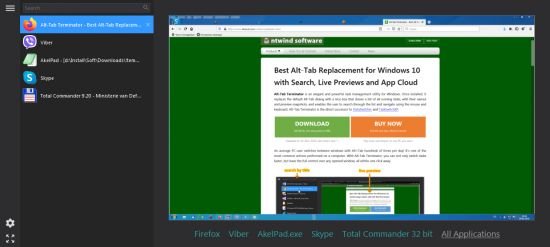
Alt-Tab Terminator is an elegant and powerful task management utility for Windows. Once installed, it replaces the default Alt-Tab dialog with a nice box that shows a list of all running tasks, with their names and preview snapshots, and enables the user to search through the list and navigate using the mouse and keyboard. Alt-Tab Terminator is the direct successor to VistaSwitcher and TaskSwitchXP.
An average PC-user switches between windows with Alt+Tab hundreds of times per day! It's one of the most common actions performed on a computer. With Alt-Tab Terminator, you can not only switch tasks faster, but have the full control over any opened window, all within one click away.
Brand New Task Switcher
The main advantage of Alt-Tab Terminator is a brand new switching window. Unlike to the standard Alt-Tab, it shows a live desktop preview of the selected application and an easy-to-read relevant list of tasks with titled icons so you can find the one you need immediately at a glance.
• Task Preview
Visualization is the key point. Alt-Tab Terminator shows you the exact live desktop preview of the application you want to switch to, even if it has multiple child windows.
• Quick & Easy Navigation
Navigate through the task list with the keyboard (Tab, Arrow Keys, Home, End, etc.) or the mouse - simply place the mouse pointer over a task or use the mouse wheel.
• Clear Large Labels
Multiple window titles are arranged on a vertical task list; a large icon is placed by each one of them. Finding the right window has become much quicker.
• Customization
Press the Menu button in the top-left corner of the switching window to access the program menu and settings.
• Full Screen Mode
Press F11 or click the Full Screen button in the bottom-left corner to maximize the switcher window to the whole screen.
• Manage...
Read more
Continue reading...