
D3FT99 · Mar 28, 2021 at 12:39 AM" style="cursor: pointer;">

APKLab
APKLab
The ultimate Android RE experience right inside your VS Code.
APKLab seamlessly integrates the best open-source tools: Quark-Engine, Apktool, Jadx, uber-apk-signer, apk-mitm and more
to the excellent VS Code so you can focus on app analysis and get it done without leaving the IDE.
APKLab seamlessly integrates the best open-source tools: Quark-Engine, Apktool, Jadx, uber-apk-signer, apk-mitm and more
to the excellent VS Code so you can focus on app analysis and get it done without leaving the IDE.
Features
- Decode all the resources from an APK
- Disassemble the APK to Dalvik bytecode aka Smali
- Decompile the APK to Java source
- Malware Analysis using Quark-Engine
- Initialize project directory as Git repo
- Analyze & Hack effectively with feature-rich VS Code
- Apply MITM patch for HTTPS inspection
- Build an APK from Smali and resources
- Rebuild an APK in Debug mode for dynamic analysis
- Sign the APK seamlessly during the build
- Install the APK directly from VS Code
- Support for Apktool-style projects (
apktool.yml) - Support for most Apktool CLI arguments
- Android resource frameworks management (Coming soon!)
- Support for user-provided keystore for APK signing
- Download and configure missing dependencies
- Excellent Smali language support with Smalise
- Supports Linux, Windows, and Mac
Getting Started
Open APK or Apktool project
- Open the Command Palette (
Ctrl+Shift+P) ➜APKLab: Open an APK
D3FT99 · Mar 28, 2021 at 12:39 AM" style="cursor: pointer;">

- Or Just open an existing Apktool project folder
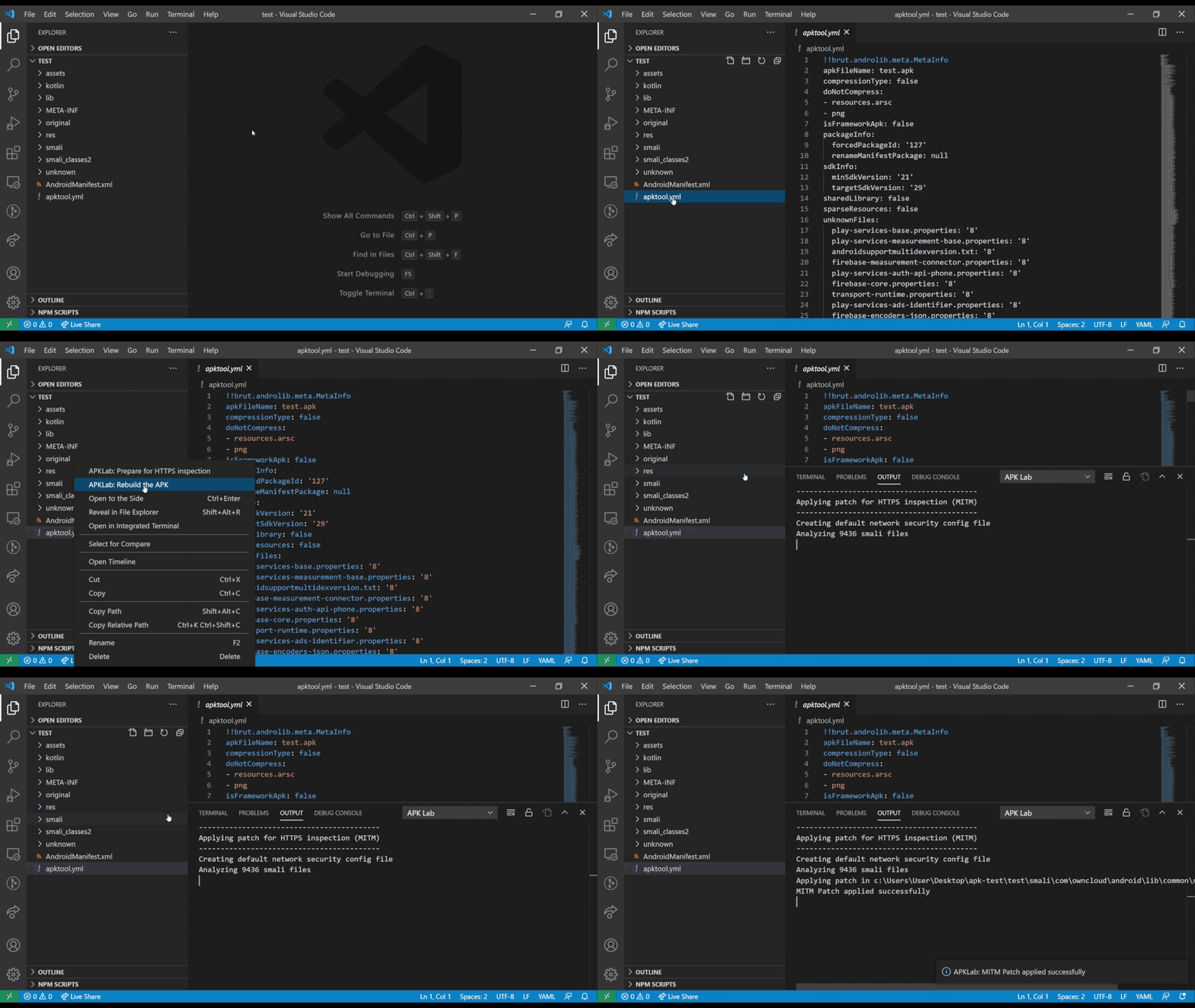
Apply MITM patch
- Right-Click on or inside
apktool.ymlfile ➜APKLab: Prepare for HTTPS inspection
D3FT99 · Mar 28, 2021 at 12:39 AM" style="cursor: pointer;">
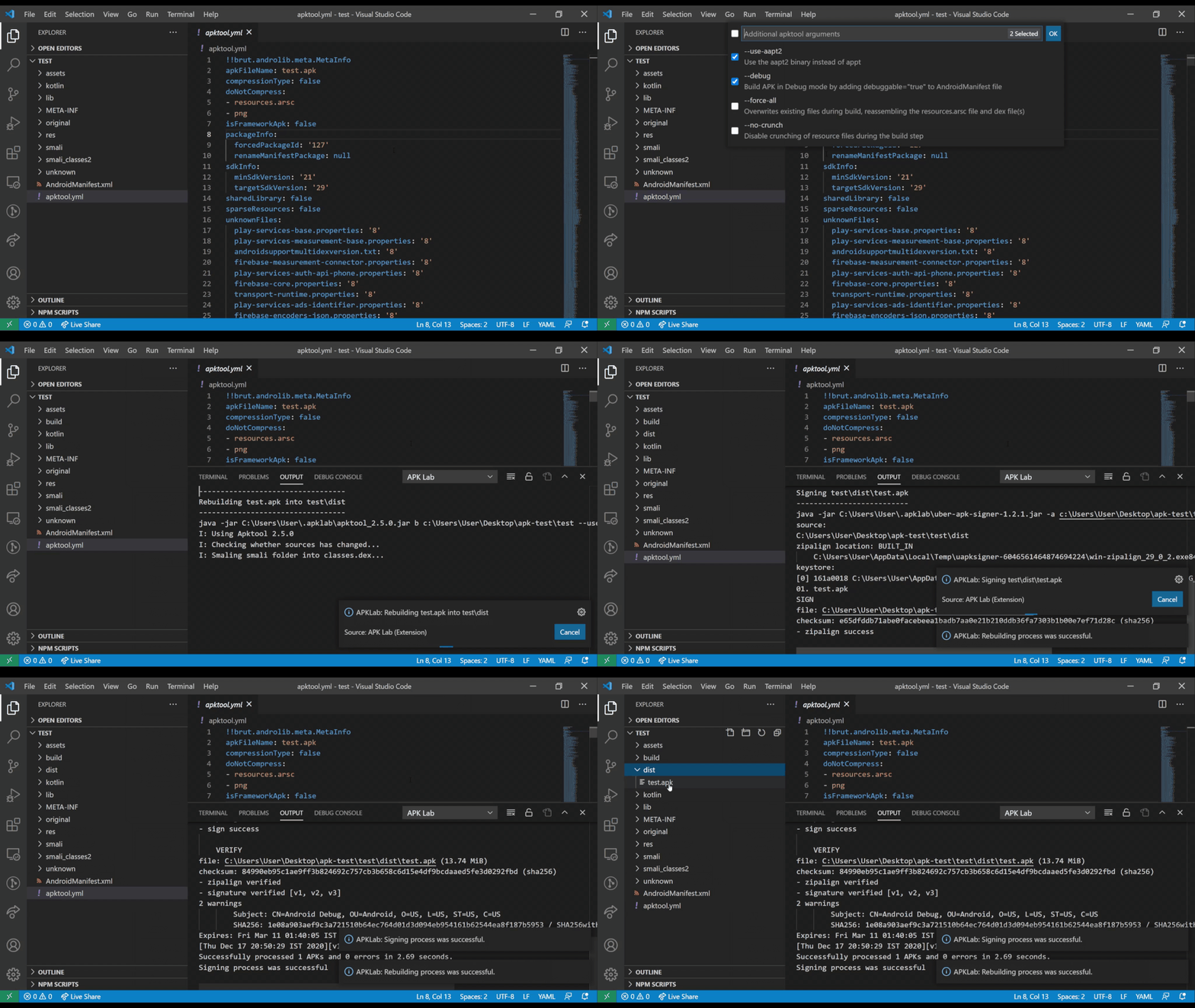
ReBuild and Sign APK
- Right-Click on
.apkfile (indistdirectory) ➜APKLab: Install the APK
D3FT99 · Mar 28, 2021 at 12:39 AM" style="cursor: pointer;">
Install APK to device
- Right-Click on
.apkfile (indistdirectory) ➜APKLab: Install the APK
D3FT99 · Mar 28, 2021 at 12:39 AM" style="cursor: pointer;">

Clean ApkTool frameworks dir
- Open the Command Palette (
Ctrl+Shift+P) ➜APKLab: Empty ApkTool Framework Dir
Requirements
- JDK 8+
Runjava -versionin your Shell, if not found, download from here.
- adb
Runadb devicesin your Shell, if not found, check this guide.
- quark-engine >=21.01.6 (for malware analysis)
Runquarkin your Shell, if not found, check official docs.
Known Issues
Contribution Guide
For bug reports, feature requests or simply discussing an idea, please open an issue here. PRs are always welcome.Source Code
Credits
- Feimaomii for the awesome logo
- Aman Sharma for active contribution
- Niklas Higi for apk-mitm
- Shaun Dang, JunWei Song & KunYu Chen for Quark-Engine
- iBotPeaches, brutall and JesusFreke for Apktool & Smali
- patrickfav for uber-apk-signer
- skylot for Jadx
- Loyie King for Smalise