


King
Administrator
- Joined
- Jul 12, 2021
- Messages
- 25,005
- Reaction score
- 5
- Points
- 38
File Size: 92.6 MB
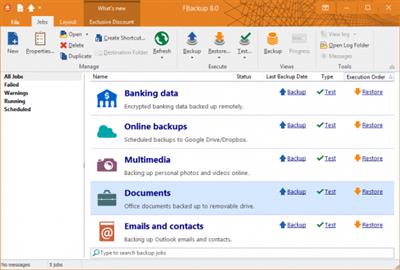
Sometimes, the inevitable happens and your computer needs a hard disk format or, even worse, you're faced with a hardware failure. In order to prevent losing your entire data collection, you should start creating backups. FBackup is an application designed to help you backup your personal files and protect them. These can be saved on your hard drives or on your local network. By accessing the app's "Properties", you can also choose to save your files to an external hard drive or a removable device. FBackup allows you to create a full copy or only create a mirror for your files. Furthermore, you can encrypt the data and add a password. This means that only you restore your backups.
Features
It's free for personal and commercial purposes
FBackup is a backup software free for both commercial and personal use. This means that you can save some money by not having to buy another backup program.
Automatic backups
You define a backup job, set it to run automatically, and forget about it. FBackup will automatically run the backup at the scheduled date, so you have the benefits not only of having your data protected, but you'll also save precious time.
Backup with standard zip compression
When using "full backup", the sources will be archived using standard zip compression. FBackup uses ZIP64 compression, which means that it can create zip files over 2GB in size. Also, you can password protect your backup zip files.
Exact copies of files
If you don't want to have the files stored in one zip file, FBackup can make exact copies of the backup sources using "mirror backup". Since FBackup will also back up empty folders, you can use this backup type to create in the destination a "mirror" copy of the original files. It also includes a Fast Mirror option that will copy only new and modified files.
Protection against ransomware
Ransomware are some...
Read more
Continue reading...