


King
Administrator
- Joined
- Jul 12, 2021
- Messages
- 25,005
- Reaction score
- 5
- Points
- 38
File Size : 9.8 Mb
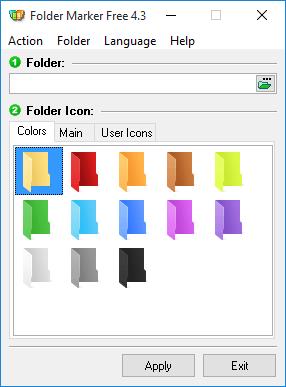
A freeware add-on for Windows lets you mark folders with color-coded icons to make a search for important information a "one-glance" affair.Folder icons can be customized using the standard Windows method, but with Folder Marker Free you can do this on the fly from the right-click menu of a folder. So there is no need to go through additional dialogs or run Folder Marker Free itself! Simply select the folder you want to mark, right-click on its icon and select a color-coded icon from the drop-down menu. The icon will be assigned to the folder at once.
With the same simplicity, you can mark several folders. Simply select a group of folders with the mouse and assign a new icon from the right-click menu. Another great option is an ability to add up to ten icons of your choice to Folder Marker and use them in marking along with the default icons. The program can assign icons to a folder from a wide array file formats, including ICO, ICL, EXE, DLL, CPL or BMP.
Key features
Folder Marker can change a folder icon with one mouse click
Folder Marker can mark folders by priority (high, normal, low), by degree of work complete (done, half-done, planned) and by the type of the information contained in a folder (work files, important files, temp files, private files).
Folder Marker can change a folder's color
Folder Marker changes folder icons from a popup menu of the folders. To mark a folder, you don't even need to run the program!
Folder Marker's menu can contain convenient category submenus.
Folder Marker contains a User Icons tab. Add up to 10 of your favorite icons and mark folders with them. It's easy!
Folder Marker can work with several folders at once
Folder Marker can assign an icon to a folder from: ICO, ICL, EXE, DLL, CPL or BMP file
Folder Marker supports 32-bits icons
Folder Marker can change the icons of ALL folders in...
Read more
Continue reading...