


King
Administrator
- Joined
- Jul 12, 2021
- Messages
- 25,005
- Reaction score
- 5
- Points
- 38
File Size: 14.4 MB
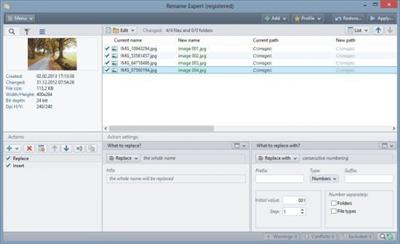
With Rename Expert you can quickly and easily rename files and folders. The program offers a variety of innovative features to create consistent and, above all, meaningful names. With a few simple clicks, you can number files and folders, shorten long file names, rename file extensions and much more. Rename Expert supports metadata such as Exif, IPTC, and ID3. By using metadata, you can organize, sort, and rename files automatically. Despite its diversity of functions the program is very easy to use. With Rename Expert, meaningless file names are a thing of the past!
Key features
Icon rename files folders
Simultaneously rename folders along with subfolders and files
Allows the batch renaming of any number of files and folders in one go (incl. network support).
Icon filter
Filter and sort functions
The extensive filter and sort functions can also be used for metadata, allowing the inclusion and exclusion of files and folders.
Icon CSV files
Use CSV files for naming
CSV files - for example, exported from Excel, can be used flexibly for naming files and folders. The old and new name can be composed of several columns.
Icon move files
Move and rename files in one step
In addition to renaming, files can also be moved or copyied into subfolders whose naming is based on metadata (e.g., picture taken date, creation date, etc.).
Icon special functions
Many special functions
Rename Expert offers a variety of specialized functions, such as adding the checksum (MD5, SHA, CRC32) of the file contents to the file name, the encryption of folder and file names, or the possibility of adding random characters to file names as well as to rename files completely random.
Icon preview new file names
Real-time preview of the new file names
All changes are shown in real-time and are checked for errors (e.g., duplicate name) to avoid possible conflicts.
Icon use...
Read more
Continue reading...