


King
Administrator
- Joined
- Jul 12, 2021
- Messages
- 25,005
- Reaction score
- 5
- Points
- 38
File size: 46 MB
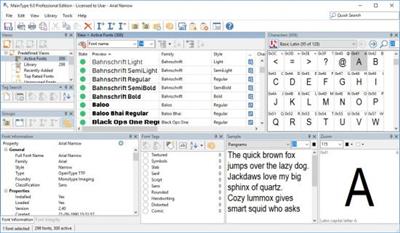
MainType is a powerful but easy to use font manager and font viewer for Windows, that takes the frustration out of managing your fonts. It is packed with tons of intuitive features that makes it simple to find, preview, organize, install, and print your fonts. MainType makes it simple to find, preview, organize, install, and print your fonts. MainType supports all common font formats: TrueType, OpenType, TrueType Collections, and Postscript Type 1 fonts. Unlike simple font preview applications, MainType is designed for graphic artists, typographers, and other power users who demand high-end functionality such as network support, plug-ins, advanced categorizing, searching capabilities, and fast searches for the fonts that you need.
Unicode Character Grid
Easily navigate through Unicode blocks, copy characters to the clipboard, sample panel or directly insert them from the font manager into background applications.
Notes, Tags, and Ratings
Add custom notes to your fonts, give them a rating, and tag your fonts with simple keywords and quickly find the font you need by searching for these keywords.
Customizable Layout
MainType uses an advanced docking system that allows you to configure the layout the way you want! Whether you want your panels hidden, docked, floating or in tabs it's all possible.
In-depth Font Comparison
Simply drag and drop up to 5 fonts onto the font information panel to compare font properties. This helps you identify which font version you want to use, uninstall, categorize, or print.
Print Reports
Print samples of your fonts, and choose between four predefined reports. Optionally preview before printing, so you can be sure you print the font listings, character sets, or font information pages you want.
Team Synchronization
Let MainType synchronize specific folders on your filesystem or network with special groups in the...
Read more
Continue reading...