


King
Administrator
- Joined
- Jul 12, 2021
- Messages
- 25,005
- Reaction score
- 5
- Points
- 38
PDFsam -PDF Split and Merge 4.3.4
File Size : 51.7 Mb
PDF Split and Merge is an easy to use tool to merge and split pdf documents. Provides a grafical interface and a command line interface to spit, merge, mix and rotate your PDF documents.
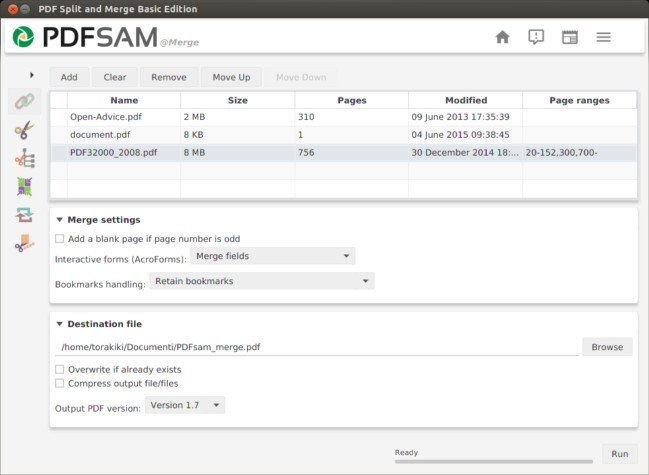
PDF Split and Merge Basic is an application that you can use to perform several actions on your PDF files, including merging, splitting, rotating and rearranging pages.
The interface of the program is plain and simple. On the left side of the window you can select an action between "Alternate Mix", "Merge/Extract", "Rotate", "Split", "Visual document" and "Visual reorder".
In the list you can view the path, number of pages and version of each PDF file, after you add them (the "drag and drop" method is supported).
So, you can configure mixing options, such as reverse the first or second document, set the number of pages to switch from the first/second document to the other.
Furthermore, you can set options for merging (PDF documents contain forms), rotation (clockwise rotation for 90, 180 or 270 degrees, for all, even or odd pages) and splitting (e.g. split even or odd pages, into single pages, after specific ones, by bookmarks level).
Plus, you can open a PDF file, rearrange, extract, delete pages and save them in a new file, zoom in and out, and more.
In the "Settings" menu, you can change the interface language and theme, set the log level, set PDF Split and Merge Basic to automatically check for updates at startup, disable alert sounds, enable to ask for confirmation when the overwrite checkbox is selected, and others.
The program uses a high amount of system resources and didn't freeze, crash or pop up errors during our tests. Unfortunately, there are no guidelines available and users might have a hard time getting around PDF Split and Merge Basic's features.
The interface could use some improvements in the way that it is...
Read more
Continue reading...