


King
Administrator
- Joined
- Jul 12, 2021
- Messages
- 25,005
- Reaction score
- 5
- Points
- 38
VovSoft Text to MP3 Converter 2.3
File size: 16 MB
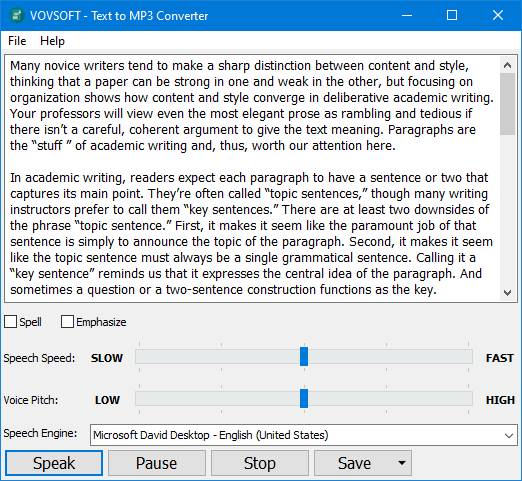
Easily convert your text into speech. Perfect for e-learning, presentations, YouTube videos and increasing the accessibility. The text can be exported as MP3 and WAV files. This program uses the preinstalled Microsoft SAPI Text-to-Speech (TTS) engines for generating voice.
Text to MP3 software
If you need to simply convert some text into audio content or you're just looking for a way to preview some content without having to actually spend time reading it, Text to MP3 Converter can do both, offering you choices for the used speech engine, as well as the output audio format. The two main options offer users the choice of increased quality (WAV) or a more compact recording (MP3). "Speech Speed" option allows from 10x slow to 10x fast playing and recording. If you seek a basic application that can help you perform text to audio conversions, without having to resort to complex steps and configuration processes, try out this simple yet quite capable software.
Key Features:
Checkmark Speech speed (fast-slow)
Checkmark Voice pitch (high-low)
Checkmark Spell
Checkmark Emphasize
Checkmark Multiple speech engine support
Checkmark Read aloud
Checkmark MP3 export
Checkmark WAV export
Whats New
Application automatically makes Speech_OneCore voices available, if application is run as administrator
Installer runs the application as administrator
Volume is the highest, by default
Application displays text length in bytes
Added Settings menu
Application remembers voice pitch, volume and speech speed values
Clicking X button on last tab closes application
Fixed first created tab’s bad positioning
Fixed “View” menu behavior
Implemented loading cursor
Homepage
Code:
https://vovsoft.com...
Read more
Continue reading...