

Description
Wireshark is a professional network protocol analysis software that enables you to record and review data from a live network or from a recorded file. You can interactively review the recorded data and see the summary information and details of each packet. Wireshark software is a free and open source software and is used for network troubleshooting, packet data viewing, communication protocol development and training in the field of Internet and network.Features and specifications of Wireshark software:
- Live recording and offline analysis
- In-depth review of hundreds of protocols and protocols added in different novel ranges
- Retrieved network data can be checked through a GUI interface or through TSHark TTY mode tool
- Decryption support for many protocols including IPsec, ISAKMP, Kerberos, SNMPv3, SSL / TLS, WEP and WPA / WPA2
- Ability to write and read various recorded formats such as tcpdump (libpcap), Pcap NG, Catapult DCT2000, Cisco Secure IDS iplog, Microsoft Network Monitor, Network General Sniffer and…
- And…
Wireshark system requirements
System RequirementsWindows 10, 8, 7, Server 2019, Server 2016, Server 2012 R2, Server 2012, and Server 2008 R2
Any modern 64-bit AMD64 / x86-64 or 32-bit x86 processor.
500 MB available RAM. Larger capture files require more RAM.
500 MB available disk space. Capture files require additional disk space.
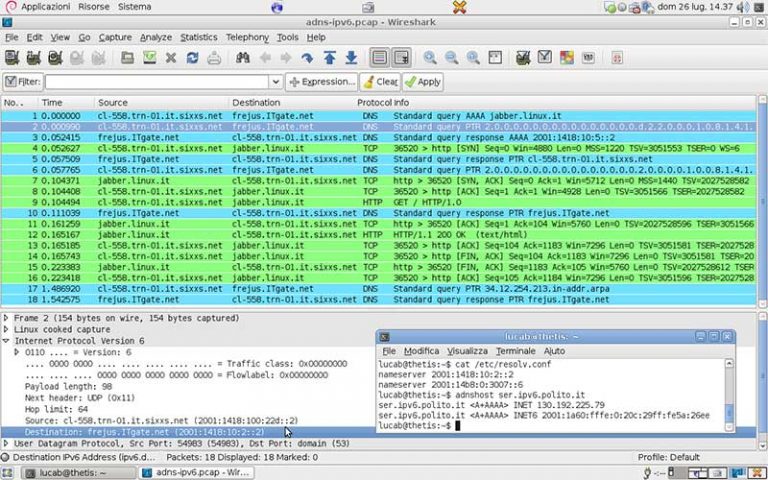
Wireshark images
Installation guide
This program does not need to be activated.download link
Download Wireshark 3.4.10 x86Download Wireshark 3.4.10 x64
Download Wireshark 3.4.10 x86 Portable
Download Wireshark 3.4.10 for macOS 10.12 and later Intel 64-bit