


King
Administrator
- Joined
- Jul 12, 2021
- Messages
- 25,005
- Reaction score
- 5
- Points
- 38
Xilisoft iPhone Ringtone Maker 3.2.16 Build 20221128 Multilingual
File size: 49 MB
Now create your own iPhone ringtone from your favorite music or video without ever buying from iTunes Store! You can make ringtone from all video/audio formats like AVI, MPEG, WMV, MP4, H.264/AVC, AVCHD, MKV, RM, MOV, MP3, WMA, AAC, WAV, RA, M4A, and AC3. With the smart iPhone ringtone maker, you can also transfer the converted file directly to your iPhone.
Fully support all iPhone/iPad/iPod, iOS 16, iOS 16 and iTunes 12
Convert WMA, WAV, RA, M4A, MP3 audio to iPhone ringtone in M4R format
Convert videos like AVI, WMV, MP4, AVCHD and MKV to ringtone
Directly export converted ringtone to iPhone
Make iPhone Ringtone from Any Video and Music
Convert video or audio files to M4R iPhone ringtone
iPhone ringtone converter
Convert Music Files Such as MP3 to iPhone Format
Xilisoft iPhone Ringtone Maker supports a wide range of music formats like MP3, WMA, WAV, and M4A.
Extract Music from Videos
You can even extract audio from videos such as movie clips, music video, TV show segment and set it as your ringtone. Many video formats are supported: AVI, MPEG, WMV, DivX, MP4, H.264/AVC, AVCHD, MKV, RM, MOV, XviD, and 3GP.
Transfer and Customize iPhone Ringtones
Customize and listen; Export ringtones straight to iPhone
MP3 to M4R
Transfer Ringtones to iPhone directly
After conversion, Xilisoft iPhone Ringtone Maker can transfer the converted tune directly to your iPhone without iTunes!
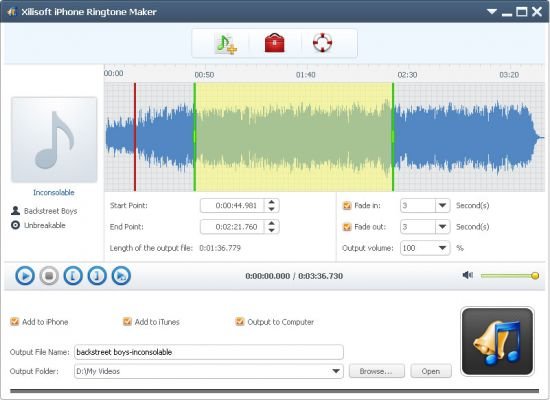
Customize Ringtone Duration
Snip your favorite music's chorus or a certain segment of an audio file and set it as your iPhone ringtone. Now you can set the time to millisecond and create ringtones more precisely!
Add Fade-In and Fade-Out Effects
This iPhone ringtone creator allows you to add fade-in and fade-out effects to your iPhone ringtone for personalization.
Concise and Multilingual Interface
Easy conversion in...
Read more
Continue reading...