


King
Administrator
- Joined
- Jul 12, 2021
- Messages
- 25,005
- Reaction score
- 5
- Points
- 38
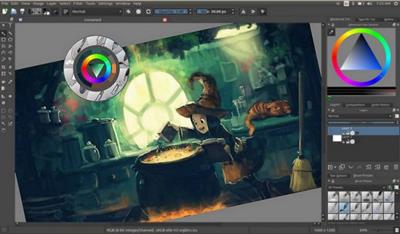
Krita Studio 5.1.2 (x64)
File size: 123 MB
Krita Studio is the powerful painting application for professional artists, VFX and game studios. The uniquely innovative brush engines, the intuitive and fun interface and adherence to industry standards for pipeline integration, guarantee that Krita Studio supports your workflow and helps you get the most out of your ideas.
Features
Krita has a user-friendly interface. In the settings menu, you can choose the color theme, which toolbars and dockers you want to use, and edit keyboard shortcuts. Save a given set of dockers as a workspace and switch between them. The canvas can be easily rotated and mirrored. The OpenGL canvas supports high-bit depth monitors. There is a large set of options available to create a no-distractions canvas-only painting mode
It is easy to create seamless textures and patterns now. Press the 'W' key while painting to toggle wrap-around mode. The image will make references of itself along the x and y axis. Continue painting and watch all of the references update instantly. No more clunky offsetting to see how your image repeats itself. You can even paint off the edge and it will automatically start painting on the top. It is one of those features you have to see for yourself.
A brush engine is more than just a typical brush pattern with settings changed. Each brush engine has its own logic and behavior. The included engines are pixel, smudge, duplicate, filter, hairy, hatching, texture, chalk, color smudge, curve, deform, dyna, experiment (Alchemy), grid, particle, sketch, and spray brushes. Brush settings can be saved as presets and shared. There are a staggering amount of blending modes available. The blending modes are arranged by category and have your favorites stored at the top of the list.
Krita comes with many methods of selecting parts of your canvas in order to edit...
Read more
Continue reading...