


King
Administrator
- Joined
- Jul 12, 2021
- Messages
- 25,005
- Reaction score
- 5
- Points
- 38
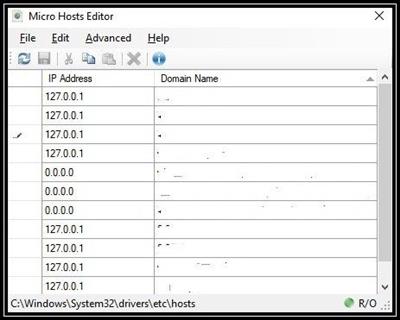
Micro Hosts Editor 1.2.1
File Size : 2 Mb
Micro Hosts Editor is a small, simple, cross-platform and completely free open-source Hosts editor. You can easily edit your Hosts file using simple GUI.
Organize your addresses
The hosts file itself can be found within the "Drivers" folder of Windows' "System32" directory, and while no particular program is set to open it by default, this also prompts users to pick their preferred text processor for editing it. As such, while the operating system's built-in Notepad can suffice for adding a couple of domains at an infrequent rate, having to tackle it on the daily can feel uncomfortable at times, which is where the app at hand comes into play.
Since the utility needs to alter a core system component, it is important for users to note that running it as administrator is a must if they wish to do more than just view the hosts file. One advantage that Micro Hosts Editor has over the quintessential Notepad is that users do not have to manually navigate to the file's path, given the fact that the program automatically opens it when initialized.
Users are greeted to a straightforward, tabular layout that lets them easily paste addresses and domains into their dedicated columns, with the added benefit of sorting them in alphabetical order to find items in longer lists. Those with keyboard-focused workflows can reload the file from disk once the progress is saved to ensure the changes were picked by the operating system using the F5 hotkey, while holding the Control key, clicking on the preferred rows and then combining the Shift and Delete shortcut lets you eliminate multiple domains at once.
Accessible way to edit your hosts files on Windows
Whether you need to change the address of one of your local file servers, or you simply wish to block malware-filled websites from redirecting you while browsing a webpage filled...
Read more
Continue reading...