


King
Administrator
- Joined
- Jul 12, 2021
- Messages
- 25,005
- Reaction score
- 5
- Points
- 38
File size: 7.0 MB
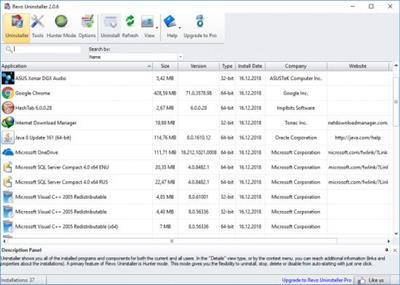
Revo Uninstaller helps you to uninstall software and remove unwanted programs easily.
Uninstaller
The Uninstaller module is Revo Uninstaller's primary feature for situations when a program won't uninstall normally or when you have some doubts that a program has not been uninstalled completely.
Also when a program is uninstalled, often times there are multiple files, folders, and/or Registry entries left on your system, which can cause various issues if not removed. This happens more frequently than you might think.
Revo Uninstaller acts as both a replacement and a supplement to the built-in functionality in Windows by first running the built-in uninstaller for the program, and then scanning for leftover data afterwards, making it your best choice when it comes to completely remove stubborn programs, temporary files, and other unnecessary program data that is left behind after the standard uninstall process.
Hunter Mode
Hunter Mode is an innovative feature that allows you to select in a more flexible way the program to uninstall or manage. When you activate Hunter Mode, Revo Uninstaller's main window will disappear, and a new targeting icon will appear instead. Simply drag and drop that icon over the opened window, System Tray icon, or Desktop icon of the program you wish to control, and Revo Uninstaller will display any available options in a convenient menu. This can be very useful because many programs loading on start-up and/or remain in the system tray without your consent, or you do not even know which program that is.
The Hunter Mode can come in handy when you want to uninstall an unknown program (or at the very least disable its automatic start-up in Windows), which you cannot find listed anywhere, but you can see its window or icon.
8 Additional Cleaning Tools included
Autorun Manager - control Windows startup
Junk Files Cleaner -...
Please Login or Register to view content
Continue reading...