


King
Administrator
- Joined
- Jul 12, 2021
- Messages
- 25,005
- Reaction score
- 5
- Points
- 38
TurboCollage 7.2.10.0 Home / Advanced / Professional Edition
File size: 8.6 MB
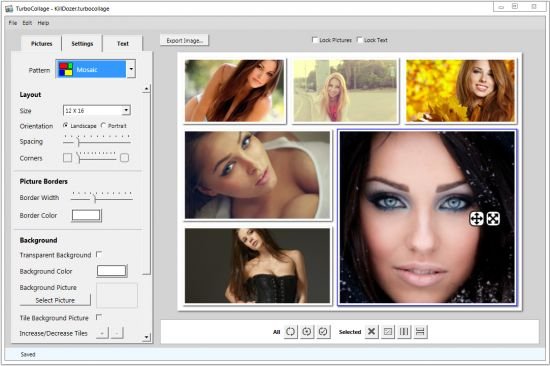
TurboCollage is a lightweight software application whose purpose is to help you create collages made up of images, text, as well as transparent or custom backgrounds.
User-friendly layout and importing/exporting options
The GUI looks clean and intuitive, allowing you to add photos in the working environment using the built-in browse button or drag-and-drop support.
It works with the following file formats: JPEG, PNG, BMP, TIFF, and GIF. You can print or export the generated collage to one of the aforementioned file formats, or save it as a project on your computer so you can easily import it for future editing tasks.
Customize your collages
You are allowed to move pictures to the preferred position in the working environment, delete the selected image, resize objects, lock the image and text, as well as shuffle items in the collage. TurboCollage lets you choose between different collage patterns (mosaic, picture pile, picture grid, center frame, zig mosaic).
Several tweaks can be applied to the layout, namely you may choose between predefined size options (e.g. wallet, poster, square), change the orientation (landscape or portrait), adjust the spacing between objects, as well as alter the form of the corners.
You may opt for a transparent background, add a photo from your computer, or select a background color, and draw shadow with custom x and y offset and blur options.
Custom text can be added in your pictures. You may type the text directly into the main window or paste it from the clipboard, alter the text in terms of font, style, size, and alignment, change the background opacity and color, as well as add text shadow.
Bottom line
All things considered, TurboCollage integrates an essential suite of features for helping you generate user-defined collages. It doesn’t come with a...
Read more
Continue reading...