

King
Administrator
- Joined
- Jul 12, 2021
- Messages
- 25,005
- Reaction score
- 6
- Points
- 38
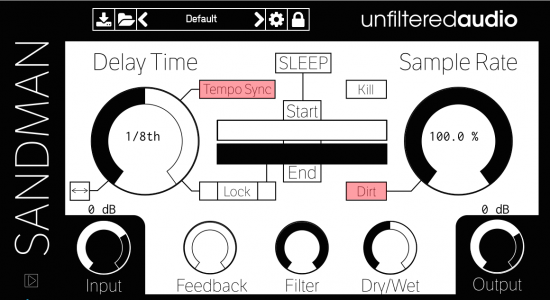
Unfiltered Audio Sandman v1.4.0
TeamCubeadooby | x64: VST3, VST2, AAX | x86: JBridge files for 32 bit usage | 10.8 MB
At first glance, Sandman offers the most basic parameters found on a delay plugin - host synch-able Delay Time and ping-pong feedback, along with a wet/dry mix and a filter for good measure. Use these standard features for flanging, comb filtering, or adding string-like texture to percussive sounds. The Sample Rate parameter can add vintage grime or completely decimate a sound by directly lowering the sample rate of the DSP engine; an adjacent Dirt switch gives you the loving character of a lo-fi recording.
Sandman's namesake is its unique SLEEP button - the hub for the granular wonders that lay in wait.
With SLEEP, you can 'freeze' audio at a point in time to create a loop based on the Delay value, allowing you to adjust the sample Start and End points. Long Delay values can produce beat-repeats or stutter effects, while shorter values turn Sandman into what is essentially a wavetable synthesizer; the Start and End times can even overlap each other, reversing your sample by up to 100%. Drop the Sample Rate and Delay time while Sandman is asleep, and you now have granular synthesis at your fingertips. Several of these parameters can be modulated by Sandman's synch-able LFO section, while an advanced de-clicking algorithm ensures clean edges no matter how much mayhem ensues. But if it ever gets out of hand (which...
Read more
Continue reading...