


King
Administrator
- Joined
- Jul 12, 2021
- Messages
- 25,005
- Reaction score
- 5
- Points
- 38
File Size: 21.5 MB
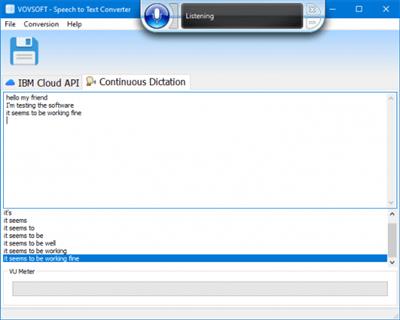
Vovsoft Speech to Text Converter is an automatic speech conversion software to convert English, Arabic, Chinese (Mandarin), Czech, Dutch, French, German, Hindi (Indian), Italian, Japanese, Korean, Portuguese (Brazilian), Spanish voice into text. This audio to text utility can save you hours transcribing interviews, meetings, podcasts or any long audio files.
Record or load audio file
You can record your own voice using your microphone or load any audio file (MP3, FLAC, WAV, OGG, WEBM) in order to convert to text. High quality audio improves results but you can also use narrow-band models for low-quality files.
Automatic speech to text transcription
If you have recorded some important lectures or speeches and want to convert them into text (transcription), you can either go the manual route of listening to the speech and typing the text or you can make use of the recent developments in the artificial intelligence (AI).
Convert voice recording to text on computer
Vovsoft Speech to Text Converter is such an AI powered software that can take your audio files, run them through IBM AI servers and produce very accurate transcripts. It uses language profiles for recognition, and if you are not getting good speech-to-text conversion then switching to a different profile can give you better results. This program is ideal for both professionals and home use.
Supported Engines
The software supports both offline and online speech engines
Continuous Dictation uses Microsoft Speech Platform which is the built-in (offline) speech recognition engine of Microsoft Windows.
IBM Cloud Speech to Text API can convert up to 500 minutes per month for free.
(IBM Cloud may require a valid credit card for registration and may not be available in some countries such as China and Taiwan)
Code:
Please Login or Register to view content
...
Please Login or Register to view content
Continue reading...